
AI workshop for sales teams · on site or online
Copilot for sales training: an AI workshop for sales teams
A hands-on workshop where your sales team works on real tasks from its own day: preparing customer visits, qualifying prospects, writing follow-ups. Everyone leaves with three to five Copilot workflows they can use right away, freeing up time for customers and active selling.
After the workshop your sales team can
Prepare customer visits in minutes, with a clear goal and the right questions
Qualify prospects with a simple research and scoring routine
Write follow-ups and visit reports straight from their own notes
Use their own agents for the tasks that come back every week
Outcomes
What your sales team can do afterwards
The workshop moves from the first prompt to a personal working system. Every exercise ends with a result your team uses the next day.
More time with customers
Admin work such as reports, emails and research gets done much faster.
Better prepared
Every meeting starts with a clear goal, good questions and strong arguments.
Stronger conversations
Your team rehearses call strategies and objections with Copilot as a sparring partner.
One shared system
The best prompts go into a team library and stay in the company.
Copilot in sales
Three levers for Copilot in sales
Each use case is linked to a moment in the sales process, so your team sees at a glance where Copilot adds the most.
Prepare
Research customers, markets and competitors and plan the meeting step by step.
Sell
Develop call guides, value arguments and answers to objections.
Follow up
Create follow-up emails, visit reports and proposal building blocks in minutes.
Use cases
Six sales use cases your team builds itself
We work with cases from your business. Before the workshop we agree on the typical tasks of your sales team.
Prepare
Prepare a customer visit
- Customer profile from website, notes and history
- Meeting goal and key questions
- Matching references and arguments
Prepare
Find and qualify prospects
- Target list with clear criteria
- Research on needs and contacts
- Prioritised by potential
Sell
Call strategy and arguments
- Value arguments per target group
- Anticipate and answer objections
- Rehearse the call with Copilot
Prepare
Competitor and market analysis
- Competitors side by side
- Market trends in a nutshell
- Your own strengths made clear
Follow up
Follow-up emails and visit reports
- Report from bullet points or a voice note
- Follow-up email in your company's tone
- Next steps captured cleanly
Follow up
Proposals and tenders
- Extract requirements from tenders
- Draft proposal texts and cover letters
- Check completeness with a review agent
Optional: analyse
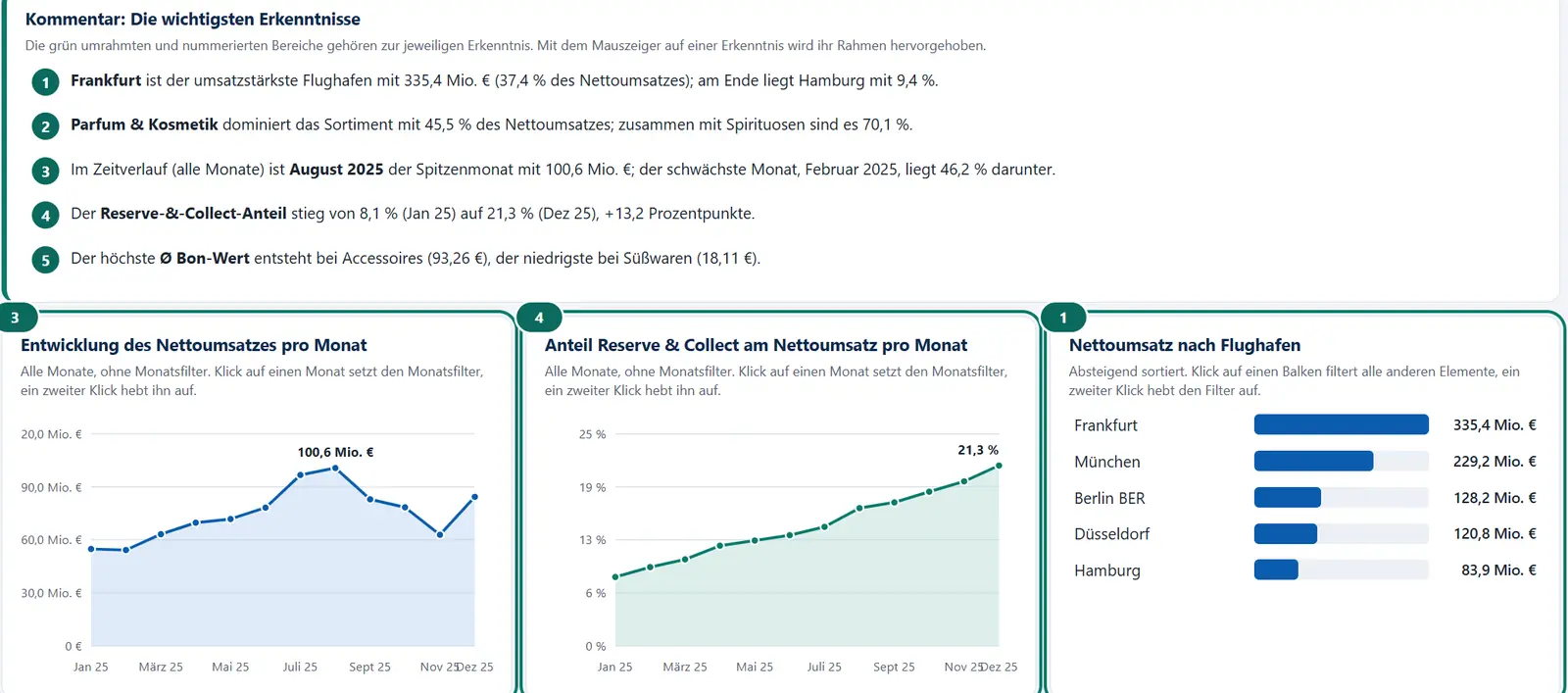
Sales figures as an interactive dashboard
From a sales export, Copilot in Excel builds a dashboard with KPI cards, filters and charts. The sales meeting is ready without an evening of pivot tables. Your team learns the prompts and checks the key figures before sharing them.
Agent workflows
Copilot agents for sales: two workflows your team builds itself
In the workshop, good chats become personal agents. Each agent has one job and hands on a finished piece of work. You read every output and decide before you pass it on.
Workflow 1: prepare a customer meeting
Workflow 2: create a sales presentation
Nothing moves by itself
Each agent hands you a file. You save it on your computer, in OneDrive or SharePoint and attach it to the next agent yourself. You stay in control at every step, and your team can reuse each step on its own.
A complete agent chain with copy-ready prompts: Copilot for presentations
Formats
How the workshop fits your calendar
The workshop works as a session at your sales kick-off, as a full training day or as a kick-off with a short follow-up. Your team works on its own laptops throughout.
Half day at your kick-off
Three hands-on hours: the key sales use cases, built on each participant's laptop.
Full training day
More time for personal agents, the team prompt library and role-play practice.
Kick-off plus follow-up
A short online session a few weeks later to share experience and sharpen workflows.
Take-aways
What everyone takes home
3–5 ready workflows
For visit prep, prospecting, follow-up and proposals, ready to use.
Sales prompt cards
Proven templates to copy, tailored to your products.
A personal Copilot agent
For the task that comes back most often.
The team prompt library
So good solutions are available to everyone in sales.
Flow
What your workshop could look like
A proposal we tailor to your team and your cases in a short briefing call.
Arrive and take stock
Everyone asks their own Copilot what they use it for today. That becomes the map for the workshop.
Prepare
Plan a customer visit, research and qualify prospects, analyse competitors and the market.
Sell
Build a call strategy and arguments, rehearse objections with Copilot as a sparring partner.
Follow up
Visit report and follow-up email from your own notes, building blocks for proposals and tenders.
From prompt to agent
Save the best chat as a master prompt and turn it into a personal agent.
Agree next steps
Everyone picks their three to five workflows and the team starts its shared prompt library.
Clients
SkillDay works with teams from
Good to know
FAQ on Copilot for sales training
Is this a general introduction to AI?
The workshop is built entirely around sales. Basics come in briefly and practically; the focus is on concrete use cases in everyday selling.
What does your team need?
Each participant brings a laptop with internet access and can use Microsoft 365 Copilot or Copilot Chat. Everyone works on their own device throughout.
Does it work with Copilot Chat only?
Yes. Most use cases run in Copilot Chat. With the full licence we add Copilot in Outlook, Word, Excel and Teams.
Can we work with our own sales cases?
Yes, that works best. Send us typical tasks and use cases beforehand; anonymised versions are perfectly fine.
How do you handle data protection and customer data?
Your team learns which data belongs in Copilot and which does not. We are happy to include your internal rules.
Does it fit into a sales kick-off?
Very well. One morning is enough for a noticeable effect, and your team leaves the room with ready workflows.
Where does the workshop take place?
At your offices, at your kick-off venue or online, across Europe, in English or German.
Microsoft, Microsoft 365, Copilot, Outlook, Word, Excel and Teams are trademarks of Microsoft Corporation. SkillDay is an independent training provider and is not affiliated with Microsoft.
More from SkillDay: Copilot agent workshop · AI training for teams · sales kickoff workshop
Deutsche Version: Copilot für den Vertrieb

Your trainer
Jörn Steinz (MBA)
Founder and CEO of SkillDay, Hamburg
As a consultant at Accenture and in corporate development at XING AG and the freenet Group, he spent years building analyses and decision papers for top management. Today he uses AI every day in his own work and helps sales and specialist teams across Europe put Copilot to work.
SkillDay is a network of around six trainers based in Hamburg.
Contact
Bring Copilot into your sales routine
Tell us your preferred date, the size of your sales team and the tasks you want to lighten. We will get back to you within 24 hours.
Get in touch